Some DDSD Employees may be experiencing constant disconnects, green/white screens, or non-functioning cameras during Google Meets.
Below are a few steps that can be taken to help improve your experience.
1. Disable Hardware-Acceleration in Chrome
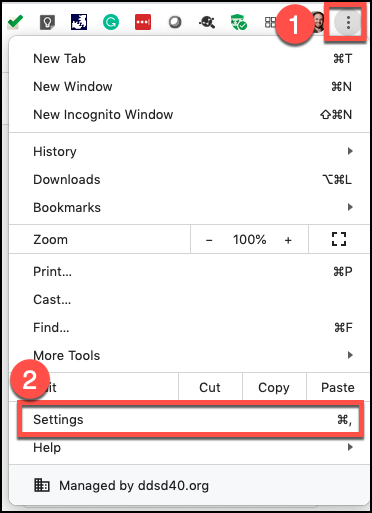
In Chrome go to the top right where there are three dots. Click on the three dots and select "Settings"
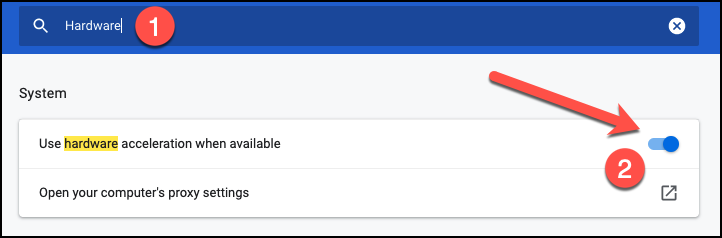
Once in settings search for "Hardware" in the blue search bar. Then turn off "Hardware-Acceleration"
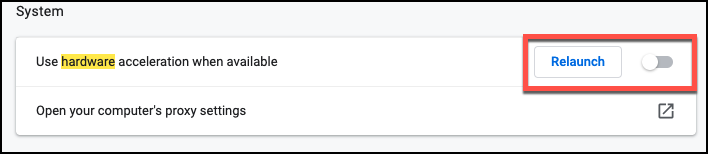
Once it is turned off you will be required to relaunch the browser:
2. Disable Any Google Meet Chrome Extensions
Some extensions may cause issues with Google Meet. To uninstall the extension please do the following:
Right Click the extension in the top right corner and select "Remove from Chrome"
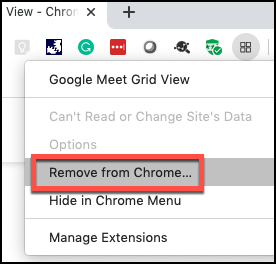
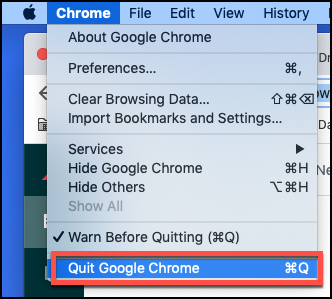
Then quit and reopen the browser.
3. Try Using Safari or Firefox Instead
If you are still experiencing issues then the last thing you can try is to join the Google Meet in Safari or Firefox. Their icons look like the following: